Generative AI in Local Government: Building the New Muscle Memory (Part 2: Platforms, Privacy, and the Next-Gen Workforce)

In Part 1 of this series, we looked at three field-tested playbooks for city clerks, municipal attorneys, and building officials. We explored how shifting your daily posture from manual typist to editorial director can turn a three-hour council transcript into clean minutes, audit state preemption conflicts in seconds, and triage a permitting queue in 48 hours.
Whenever I demo those playbooks to mayors, county commissioners, and department heads across Indiana and the Midwest, I see eyes light up.
Then, right on cue, the reality check sets in.
“Eric, this looks incredible. But our entire IT department is two people. Our software budget is frozen. And our county council is terrified of data privacy headlines. How in the world are we supposed to roll this out without getting fired or breaking the bank?”
It’s a fair question. In fact, it’s the question facing public sector leaders right now.
Let’s be honest: if adopting AI required hiring an elite machine learning team or signing a seven-figure enterprise software contract, 98% of American cities and counties would be left behind. They operate on lean tax bases, run aging back-office systems, and answer directly to taxpayers who scrutinize every line item.
Here’s the good news:
You don’t need a seven-figure innovation grant or an outside consulting army to modernize City Hall. You just need to leverage the tools sitting right in front of you, establish basic ground rules, and build the organizational confidence to start.
Let’s walk through how to do that practically, step by step.
Start With the Platforms You Already Own (“Boring” Productivity Wins)
When enterprise software vendors smell a technological shift, they immediately start pitching standalone “AI solutions.”
Suddenly, you’re being asked to buy a specialized AI chatbot for customer service, a separate AI tool for document summarization, and a bespoke AI subscription for public records redaction. Within eighteen months, you have six new vendor contracts, half a dozen logins, and zero interoperability.
That’s a recipe for vendor fatigue and shelfware.
Before you spend a single dollar on new software, take inventory of the platforms your staff already logs into every single morning.
Take Google Workspace, for example. Full disclosure: in my day job at Google, I support state and local government teams, so I have a natural bias here. But the underlying reality is true: the most impactful AI capabilities are the ones woven directly into the core tools your people use all day.
With Google Workspace, generative AI capabilities are built directly into the everyday apps your staff already touches—no separate portal, no extra standalone software contracts to juggle.
(A quick note if your municipality runs on Microsoft 365: don’t assume your team automatically has AI enabled. Microsoft typically treats Copilot as a separate, paid add-on license, so your staff may or may not have access depending on what your IT department purchased. Always check with your IT leadership before getting excited about features you might not have provisioned.)
If you’re on Workspace, consider what that built-in capability actually looks like on a Tuesday morning:
- Gmail & the AI Inbox: City managers and clerks receive hundreds of constituent emails every week, ranging from passionate neighborhood complaints to routine inquiries about trash pickup. Modern AI inbox capabilities can automatically group related citizen threads, summarize multi-party email chains, and draft courteous, context-aware responses in seconds.
- Google Docs: When a department head needs to draft a formal Request for Proposals (RFP), an administrative policy, or a council briefing memo, they no longer have to stare at a blank white screen. With a simple prompt, the model creates a structured first draft adhering to your standard municipal format.
- Google Chat: Instead of wading through endless back-and-forth chat messages after a storm event or water main break, built-in AI summarizes team chatter, highlights unresolved action items, and suggests assigned tasks.
- Google Sheets: You don’t need to be an advanced spreadsheet wizard to parse complex municipal budgets or payroll tables. You can ask questions in plain English (“show me total overtime pay by department for Q2”), generate formulas instantly, and build clean tracking dashboards with a few sentences.
Some folks dismiss this as “boring” back-office productivity.
I see it differently. Back-office administrative toil is where 80% of municipal time is lost. If an administrative assistant saves 45 minutes every morning on routine correspondence, that’s 45 minutes returned to answering phones, greeting residents at the front counter, and solving real community problems.
That’s not boring. That’s just common sense—and it refocuses our staff on higher-impact work that actually moves the community forward.
Pro Tip: Audit Before You Buy
Before approving any new vendor line item for a standalone “AI writing assistant” or “meeting summarizer,” check what capabilities your organization already owns. If you’re on Google Workspace, generative drafting, summarization, and formula assistance are already at your fingertips. If you’re in the Microsoft ecosystem, verify whether Copilot licenses have actually been provisioned for your department. Either way, audit your existing licenses first, train your team on what you already have, and see what gaps actually remain before spending taxpayer money on new software.
Grounded Research With Gemini Notebook
Beyond your daily email and documents, local government work requires wrestling with massive amounts of dense, unstructured information: comprehensive land-use plans, 300-page employee handbooks, union contracts, bond covenants, and municipal codes.
Traditional keyword search is awful at this. If you search for “sidewalk repair liability,” a standard search engine simply looks for those exact words. It cannot synthesize who is responsible or cross-reference exceptions across three different chapters.
This is where a grounded research tool like Gemini Notebook becomes a superpower for local officials.
Gemini Notebook allows you to upload your municipality’s exact source documents (PDFs, Word docs, Google Docs, meeting transcripts) into a private, grounded workspace. Because the AI is locked strictly to your uploaded materials, its answers are grounded in your actual source records, complete with inline citations you can verify with one click.
Here are three ways local teams are putting it to work right now:
- Comparing Labor & Vendor Contracts: Upload your last three collective bargaining agreements or waste management contracts. Ask the notebook: “Compare health insurance cost-sharing percentages and overtime rules across all three contracts and summarize the key differences in a table.” What used to take an entire weekend of manual leafing through three-ring binders is done before your coffee gets cold.
- Interactive Departmental Wikis: Create a notebook loaded with your city’s standard operating procedures, HR policies, and purchasing guidelines. When a new hire or department head needs to know the exact dollar threshold requiring a formal board of works bid, they ask the notebook and get the exact citation and procedure instantly.
- Audio Overviews for Council Prep: One of the most remarkable features in Gemini Notebook is the ability to generate a dynamic Audio Overview (a natural, podcast-style discussion between two AI hosts analyzing your uploaded materials). If you are an elected official or department director staring at a 150-page packet for Tuesday night’s council meeting, you can generate an audio overview and listen to a clear, engaging 10-minute briefing on your Monday evening commute.
Quick, grounded, and easy. And it costs nothing extra to start testing.
From One-Off Prompts to Institutional “AI Skills”
When teams first start experimenting with AI, they usually treat it like a casual chatbot. An employee opens a browser tab, types a rough prompt, gets an okay result, and moves on.
The problem with that approach is consistency. If three different people in your planning department prompt the AI differently, you get three wildly different formats, tones, and levels of accuracy.
To build true municipal muscle memory, you need to transition from ad-hoc prompting to standardized AI Skills.
An AI Skill is simply a persistent, reusable set of instructions tailored to your municipality’s specific rules, procedural requirements, tone, and formatting standards.
Think of it as an interactive standard operating procedure. Instead of asking a clerk to remember a 20-line prompt every time they summarize council minutes, you package that instruction set into a saved skill or custom Gem in Gemini. The clerk simply drops in the new meeting transcript, and the model automatically formats the minutes according to Robert’s Rules of Order, drafts the 3-bullet constituent summary, and generates the Spanish translation.
Here’s the thing about institutional knowledge: if it only lives in one person’s head, City Hall is fragile. When a veteran deputy clerk retires after thirty years, half the operational playbook walks out the door with them. Packaging workflows into reusable AI Skills turns personal know-how into permanent organizational capability.
You don’t have to reinvent the wheel, either.
If you want inspiration for public sector workflows, check out the Google Public Sector Agent Gallery. Google Public Sector built this curated repository specifically for government missions. It provides a library of pre-built prompts, playbooks, and specialized agent workflows designed around real public sector challenges, from grants management to constituent communications. It’s a fantastic place for local teams to see what is possible and borrow proven ideas.
Demystifying Security: You Own Your Data. Full Stop.
Let’s talk about the elephant in the room: security, privacy, and public trust.
Whenever I speak at public sector conferences, I hear well-meaning leaders say things like, “We banned AI because we can’t let citizen data leak onto the public internet.”
I understand where the instinct comes from. Public officials are sworn stewards of taxpayer trust. Nobody wants their city featured on the evening news because sensitive citizen records were exposed.
But a complete ban doesn’t actually protect your organization. In reality, blanket bans simply drive adoption underground into “shadow AI,” where employees paste work documents into unvetted, personal consumer accounts on their phones. That is the real data leak hazard.
The fix isn’t prohibition. It’s education, proper tooling, and enterprise custody.

Local governments must understand the fundamental difference between free consumer chatbots and commercial enterprise AI:
| Feature / Guarantee | Free Consumer Chatbots ❌ | Commercial Enterprise AI ✅ |
|---|---|---|
| Data Ownership | Vendor may claim broad license to inputs | You retain 100% intellectual property & data custody |
| Model Training | Your prompts train future public models | Never used to train public foundation models |
| Tenant Isolation | Data intermingled in public consumer infrastructure | Dedicated tenant boundary with organizational encryption |
| Compliance Alignment | Standard consumer terms of service | Bound by enterprise BAA, SOC 2, ISO, HIPAA, CJIS alignment |
| Access Controls | Anyone with a login sees whatever is pasted | Respects existing cloud drive IAM & file permissions |
When you deploy AI under commercial enterprise terms (such as Google Workspace with Gemini or enterprise cloud agreements), the legal and technical boundaries invert:
- You own your data: Your inputs, prompts, and uploaded documents remain your exclusive intellectual property.
- No public training: Enterprise terms explicitly guarantee that your confidential data and municipal records are never used to train public AI foundation models.
- Encrypted in transit and at rest: Your data remains housed within your dedicated tenant boundary, secured by the same enterprise-grade access controls and compliance certifications that protect your municipal email.
The Four Pillars of Local Government AI Governance
To operationalize this safely, your city or county only needs four straightforward guardrails:
- Enforce Least-Privilege Access: AI respects existing file permissions. If an employee doesn’t have permission to view confidential personnel files or pending litigation memos in your cloud drive, the AI will not surface that data to them.
- Human in the Lead (Always): Make it a hard policy that AI never approves a permit, signs off on a disbursement, or publishes an official document autonomously. The human public servant is always in the lead—as the author, the editor, and the accountable decision-maker.
- Publish a Simple, Two-Page Acceptable Use Policy (AUP): You don’t need a 40-page legal manifesto. A two-page acceptable use policy that clearly outlines approved enterprise tools, forbids inputting citizen PII into unapproved personal accounts, and establishes human verification requirements is enough to get started safely.
- Lead With Transparency: If a member of the public or a journalist files a public records request regarding your AI usage, be proud of it. Transparent disclosure builds community trust: “Our staff uses enterprise AI to assist with first-pass document drafting and meeting transcription, with all outputs reviewed and verified by staff.”
When you set up proper enterprise guardrails, the fear goes away. You’re protected, your community is protected, and your staff is empowered.
Beyond the Desk: Multimodal AI in Public Works and Inspections
When people think of AI, they usually picture text: writing emails, summarizing memos, or drafting policies.
But some of the highest-ROI opportunities in local government have nothing to do with typing on a keyboard. They happen out in the field, powered by multimodal AI (models that can see, hear, and reason across photos, video, and audio).
Consider public works and roadway maintenance.
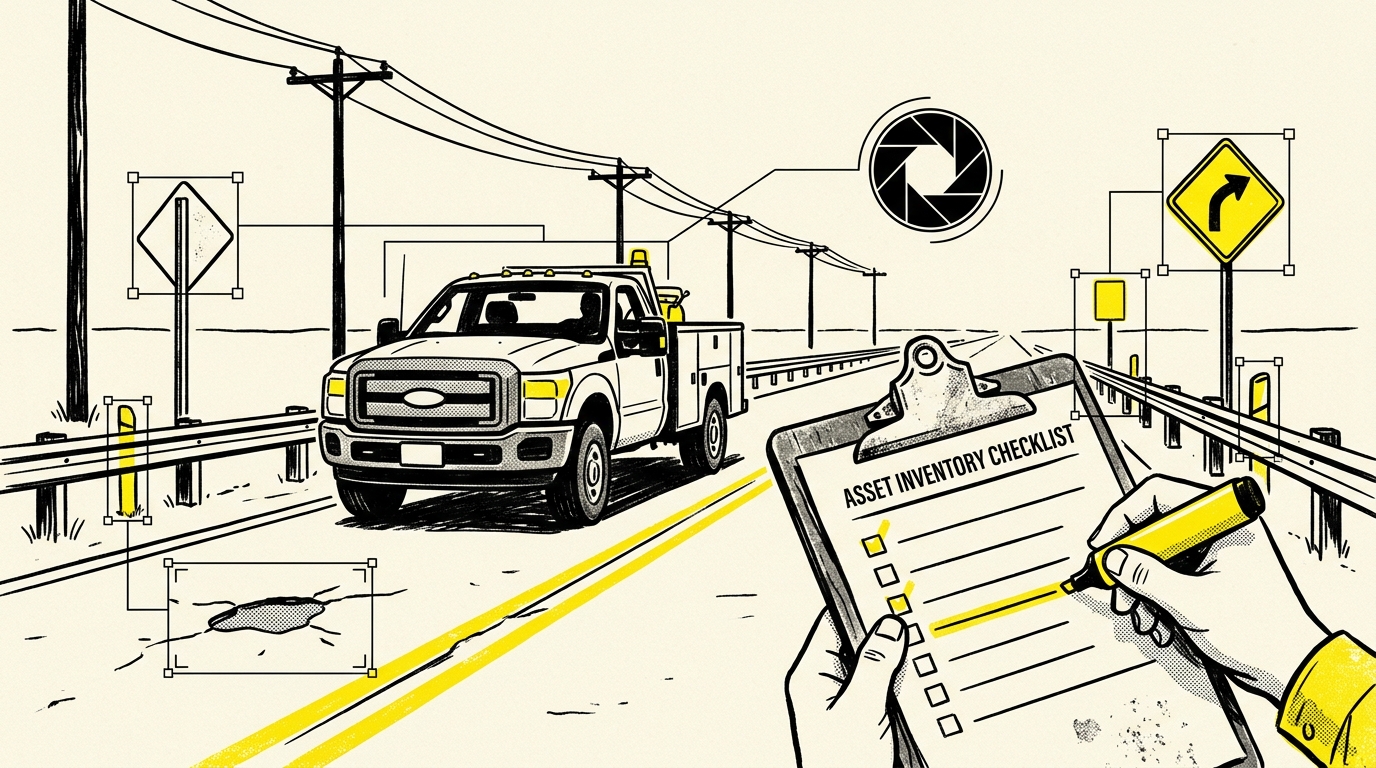
A state transportation agency recently tackled a problem familiar to every county highway department: missing asset inventories. Over decades, thousands of road signs, guardrails, and culverts had been installed across thousands of miles of roadway, but records were scattered, outdated, or nonexistent.
The traditional fix would be to put two highway technicians in a pickup truck with clipboards, driving every mile of road at 25 miles per hour for six months. The labor cost and safety risks are high.
Instead, they took existing dashcam imagery captured during routine road patrols and fed it into a multimodal model trained to detect roadway features. The AI scanned the imagery, automatically identified road signs, noted guardrail conditions, flagged pavement defects, and populated an updated GIS asset inventory in a fraction of the time and at a fraction of the cost.
Now bring that concept down to City Hall:
- Code Enforcement & Neighborhood Blight: A code enforcement officer driving through a neighborhood can snap photos of an overgrown property or structural hazard. A multimodal inspection tool can log the site, verify code violations against municipal property standards, and draft a notice of violation before the officer drives back to the shop.
- Building Inspections: Instead of juggling a paper clipboard, a tape measure, and a smartphone camera on an active job site, a building inspector records a brief voice memo while taking photos of framing or plumbing rough-ins. The AI transcribes the audio, pairs it with the corresponding images, checks it against the permit checklist, and compiles a comprehensive inspection summary ready for the contractor.
This isn’t about replacing the inspector or the highway technician. It’s about taking the heavy administrative burden off their shoulders so they can spend more time ensuring public safety and less time wrestling with data entry back at a desk.
The AI-Proficient Graduate Is Already Knocking at City Hall
There’s another urgent reason local governments cannot afford to sleep on this transition: the incoming workforce.
Right now, high schools and universities across the country are rolling out formal AI proficiency graduation requirements. Students are being taught to use AI models to conduct research, write code, analyze data sets, and build presentation decks. In some school districts, students literally cannot graduate without demonstrating mastery in leveraging AI tools.
Think about what that means for your hiring pipeline over the next two to five years.
The high school and college graduates applying for open roles in your clerk’s office, planning department, or finance bureau will be AI natives. They’ve never known a world where you stare at a blank document for two hours to draft a simple memo. They expect to collaborate with intelligent systems.
If a talented young graduate enters City Hall and is told, “We don’t use AI here,” they will not stay. They’ll walk across the street to the private sector.
At the same time, this isn’t just about hiring twenty-two-year-olds. It’s about honoring and equipping the dedicated public servants who have kept your city running for the last twenty years.
Our veteran municipal staff deserve access to modern tools that take the drudgery out of their days. When you give an experienced deputy clerk or zoning administrator the training to master these tools, their institutional wisdom (judgement) combined with AI speed makes them unstoppable.
A Free Training Resource for Your Team
If you’re wondering where to find quality training that doesn’t cost thousands of dollars, take a look at Google’s “AI for City Hall” Learning Path.
This is a comprehensive, self-paced curriculum built specifically for municipal employees. It breaks down foundational AI concepts, practical productivity workflows, and responsible public sector usage into digestible, practical courses.
You can share this directly with your staff, let them work through it at their own pace, and give them the confidence to build their own muscle memory without feeling overwhelmed.
A Rising Tide of Public Service Impact and Efficiency
Every technological leap brings its share of anxiety. When the personal computer arrived in city halls in the 80s, people worried that typewriters and filing clerks would vanish into irrelevance. Instead, computers enabled local governments to deliver services at a scale and speed previous generations could only dream of.
We’re at the exact same juncture today.
I choose to view artificial intelligence not through a lens of fear or doom, but through a posture of profound optimism. We are standing on the doorstep of a historic productivity boom.
- When an automated pre-screening workflow cuts permitting turnaround times from thirty days to forty-eight hours, a local entrepreneur opens their coffee shop a month earlier.
- When an AI model drafts multilingual council summaries in seconds, an immigrant family finally feels informed and included in their neighborhood’s civic life.
- And when a county clerk goes home on Tuesday night at 5:15 PM because meeting minutes no longer take eight hours of manual transcription, that public servant gets to eat dinner with their family.
That’s why this matters. AI in local government isn’t about replacing people. It’s about freeing our public servants to do what only human beings can do: listen with curiosity and compassion, exercise wise judgment, and build thriving, connected communities.
The tools are ready. The guardrails are clear.
It’s time to build the muscle memory.
What do you think? Where is your municipality on the journey from exploration to adoption? What is holding your team back from building that muscle memory?
Share your thoughts in the comments below, or reach out directly through my contact page. I’d love to hear what you are seeing on the ground.
Join the conversation